SeAT - forum: Assets Disappearing Randomly - Page 1
Kiba
21 Apr 2024 16:47
Note: See my fourth post for more specific details - you can probably skip the first 3.
I've noticed the total number of assets across characters tends to "flap" a lot on Seat v5 and I'm curious if there's any good way to debug it. Jobs are not failing when this occurs - but assets sometimes seem to completely clear out on some characters. Sometimes they come back - but only after the asset job is run automatically by batch or manually by clicking on the UI, upon which all assets will appear. They will later disappear again at some unknown interval. I've identified at least one character that constantly clears out but there are definitely multiple as the overall asset list across all characters will fluctuate by about ~20k objects regularly.
As for the particular character, there was a 503 on this character for the fittings endpoint a few minutes before I noticed it last clear out, though not sure its related, asset jobs haven't failed - but hoping to be able to troubleshoot a bit more - any thoughts as to how I can find the root cause of it?
Environment is very stable - not overloaded at all - otherwise since the citadel fix - and I made sure to wait until all those jobs had fully finished out and have waited a day or so since. Unsure if this is a new problem or not.
My server is in the US East coast- and I do get some 503/504's from the ESI services on a fairly regular basis - but not a massive number of them. I'm wondering if the lines of code near the end of the assets job that removes assets that it doesn't know about may be cleaning up these assets when a 503/504 occurs? Stab in the dark there.
https://github.com/eveseat/eveapi/blob/master/src/Jobs/Assets/Character/Assets.php#L125
I'm not sure if upping the timeout would help for the 504s (though I somewhat doubt it - ESI average response time on this new host is ~0.35s and the timeout is 12s roughly) - I've seen it mentioned before in the support area but no mention on how to set it.
I've made some small amount of progress - but I'm still not sure what's actually causing it. I'm seeing some commands running against the database during asset runs that look like this:
delete from `character_assets` where `character_id` = {character_id} and `updated_at` < '{current_dt}'
I've reproduced this behavior on a clean instance of SeAT with a new DB and no tokens - so I believe this may be a bug.
I did some more digging into this one - and I believe it may be related to this change here:
https://github.com/eveseat/eveapi/pull/391
I'm not sure if it's directly related - but I have confirmed the pattern with MariaDB logging and the delete in this change is at least a symptom of the problem.
Pattern is (we'll assume a clean DB):
-Execution 1 of the Assets job
1. Item(s) is/are inserted into the
character_assets table with a specific updated_at timestamp of the time it was originally inserted into the database.
2. Delete command runs (https://github.com/eveseat/eveapi/blob/a87bc79a4ad4f6f21027018b10f9452c625e2e42/src/Jobs/Assets/Character/Assets.php#L126), clearing any objects with an updated_at date of older than the $start time when the job kicked off. Nothing is deleted on this run, because any assets inserted in 1 are newer than the $start value.
3.) Everything is as expected.
-Execution 2 of the Assets job
1. Assuming characters assets have not changed, nothing seems to happen. Nothing is updated in the table, and updated_at is not updated on the original assets that were inserted in Execution 1.
2. Delete command runs, and deletes all assets (execution 1) that were not updated on this specific run - even if the character still has that asset.
-Execution 3 of the Assets job
1. Assuming again that character assets have not changed, the item(s) are again inserted into the character_assets table with the updated_at flag as expected.
2. Delete command runs and again does nothing, because the updated_at date is newer than $start
3.) Everything is as expected.
I have a feeling the above actually could possibly be the reason asset numbers are seemingly jumping around as well:
1. Let us imagine a character has Asset A.
2. Asset job 1 executes, Asset A appears
3. Character obtains Asset B
4. Asset job 2 executes, Asset B is inserted. Asset A is deleted.
5. Asset job 3 executes, Asset A is inserted. Asset B is deleted.
Hate to ping you on this @user_614098468218339348 but thought you might be interested.
Kyoia
27 Apr 2024 03:54
I think that because the $start time never updates the updated_at field in the database, the second time the character assets job runs, it wipes out the assets from the table in the database. This also explains the flip flopping of assets.
recursive_tree
27 Apr 2024 05:25
The thing is, even on the second run, we are always writing every asset, so it should update updated_at?
Kiba
27 Apr 2024 05:28
I can't say for sure as I'm not personally familiar enough to figure out how the underlying inserts work - just that I stood up a brand new docker instance from scratch with a character with a single asset and could reproduce reliably just by clicking the refresh button or waiting until the asset job runs on its own.
I turned on verbose logging in Maria and dumped the log - outside of the initial insert, there's no update to the table to update the value - and thus the next run effectively deletes it.
First run:
27 Execute    insert into `character_assets` (`item_id`, `type_id`, `quantity`, `location_id`, `location_type`, `location_flag`, `is_singleton`, `character_id`, `updated_at`, `created_at`) values (1037996030389, 672, 1, 1038457641673, 'item', 'Hangar', 1, {character_id_obfuscated}, '2024-04-27 01:46:16', '2024-04-27 01:46:16')

27 Execute delete from `character_assets` where `character_id` = {character_id_obfuscated} and `updated_at` < '2024-04-27 01:46:16'37 Execute delete from `character_assets` where `character_id` = {character_id_obfuscated} and `updated_at` < '2024-04-27 01:46:22'
To be clear since these two executions are so close together during my testing, the specific timeframe doesn't seem to matter. Whether the job is manually run with the refresh button in the UI or the run executes on its own via batching, it appears to exhibit the same behavior and so far as I can tell, seems to be 100% predictable.
This issue thread is not the same root issue - but it seems a few of the comments may be related.
https://github.com/eveseat/seat/issues/907#issuecomment-2082371070
Let me know if you need any specific logging or want to see it on a test instance. Luckily we don't use squad filters for assets but I can imagine it would be fairly annoying in those scenarios 😛
Raven
20 May 2024 04:12
@user_214209749900722189 did you find this resolved or not? I'm having asset issues after going to SeAT v5 and I'm not really enjoying it. I've had a single ship in a station on my main char since the update (last weekend) that my SeAT instance still won't show that I have. It's a little absurd. Assets are the 1 feature of SeAT for my group
Kiba
20 May 2024 04:14
Nope - I think we've isolated the cause in the above change to functionality but sadly I am nowhere near familiar enough with PHP to figure out a valid resolution so I've just posted what I know. You can get it in a "semi-good" state by clearing all asset records, to where every other update you'll have everything or nothing, which I am utilizing as a workaround for the time being.
I am under the impression this merge is causing the issue at the moment as it was working properly prior - https://github.com/eveseat/eveapi/pull/391
Which was valid to fix another issue, but the
updated_at timestamp does not seem to get updated for assets already in the database and thus the items get deleted every other execution.
Raven
20 May 2024 04:21
Yeah, what is actually updating that column
I'll dig
Kiba
20 May 2024 04:21
Currently I have determined that the column is not being updated after the insert, but that's as far as I've been able to get 😦
It may be expected that this date should be updated each time we see the asset - but based on DB logging and review of the data in a controlled manner, an update is not sent and thus the item is cleaned up when the function to clean up old items runs.
Raven
20 May 2024 04:26
Yeah in that code block it saved each asset, in surprised it's not being updated by a DB trigger
I might put one in play just to see
Kiba
20 May 2024 04:33
It's also certainly possible it may be at an even higher level than the asset job itself, but I wasn't able to trace where the updated_at date specifically comes from in the first place or if it's automatically updated by the DB itself.
I can say I disagree with the notion previously mentioned that the assets are inserted on each run as I turned on verbose logging and watched a particular set of data. It seemingly loops through these same commands over and over and we don't see the "known" item on the second iteration at all.
Raven
20 May 2024 04:35
I'm missing a Marshal that hasn't moved on my main character in a month. It's never been in the DB
So it's not doing every asset somehow.
That's what brought me here.
Kiba
20 May 2024 04:37
I’d be curious as to if you force an update to your character and see the “opposite” set of items as I did. Basically just hit the refresh button in the UI on the specific character asset page and wait for the asset job to complete.
Raven
20 May 2024 04:39
I've done that for days
And the cli command for my char too
Things get updated according to the DB column, but maybe you're right. Maybe they're actually just brand new items after the full thing's been deleted
Kiba
20 May 2024 04:42
Well, that's why I originally assumed my table was hosed due to possibly a bad upgrade from v4, and since assets are a constantly rolling list I figured starting fresh wouldn't hurt. Basically, so many assets would disappear on a regular basis or be there sometimes and not other times that I assumed something was wrong with data in the DB and then stumbled upon this change after clearing out the tables made it seemingly "worse".
"Worse" of course being subjective due to the fact that now all assets are "new" on each 2nd execution rather than a smattering of items deleted on one execution and then another set on the next.
I set up a brand new SeAT DB from scratch just to validate, and loaded a character with a single asset - so I'm fairly confident I'm not crazy 😛 however, there's certainly a possibility of another scenario interacting with this one causing further confusion.
Raven
20 May 2024 05:06
@user_214209749900722189 so, when the code runs ->save() that Model class won't actually update the timestamp if nothing about that asset has changed
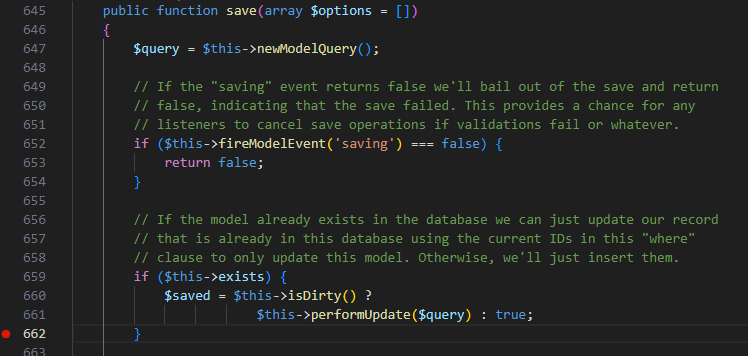
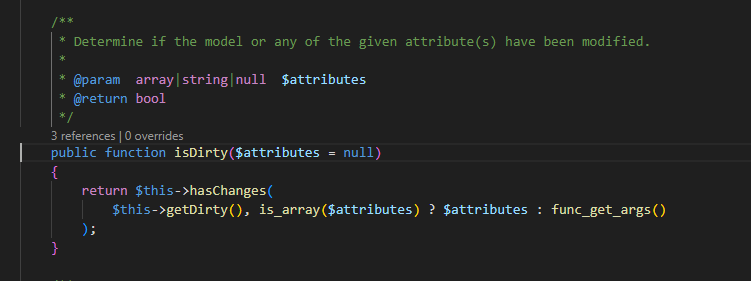
Which makes a LOT of since, considering if you're putting to the DB a row that isn't different than the current value in the DB, you don't actually want to say you updated the row, cause nothing changed.
But then the delete code in seat is not honoring that logic.
This got merged, leaving this here for a debug record:
SELECT (CASE WHEN created_at = updated_at THEN 'New' WHEN updated_at IS NOT NULL THEN 'Updated' ELSE 'N/A' END) as 'TimestampStatus', COUNT(*) FROM `character_assets` GROUP BY 1;
New 401007
Updated 13904
Just having some issues getting it to ghcr.io/eveseat/seat apparently 👀
Kiba
22 May 2024 14:57
Hmm - I think something may be broken. Getting this quite a bit since the upgrade. May have to roll back as asset jobs seem stalled.
Raven
22 May 2024 17:43
Seen, will try to debug locally but I didn't notice this kind of error 💔
Kiba
22 May 2024 18:19
It does seem a little odd. I wonder if something in the CI process broke it rather than specifically your change, but it does reference the date (sadly truncated). I actually reproduced it as well on that instance with one character that I had used for initial testing so it doesn’t seem to be isolated to a large environment.
I did reproduce the same error on both, I rolled back production.
Now that I've looked again after leaving the test instance for a bit, the job itself eventually failed with the generic "attempted too many times" but the stack above is the underlying error.
Illuminate\Queue\MaxAttemptsExceededException: Seat\Eveapi\Jobs\Assets\Character\Assets has been attempted too many times. in /var/www/seat/vendor/laravel/framework/src/Illuminate/Queue/MaxAttemptsExceededException.php:24
Raven
22 May 2024 20:05
I think it's the ->each() function that I took in from the Corporation Assets job, which apparently is different somehow.
Maybe this will get rid of the Countable|Array issues... https://github.com/eveseat/eveapi/pull/403
tmas
22 May 2024 20:32
I just manually overwrote the relevant file on my install, restarted the queue workers with supervisorctl restart seat:*, and then refreshed my characters assets. Unfortunately I still got the same error
I'm not familiar with the specific libraries being used, but the mention of
stdClass makes me think this is related to the way the JSON is being decoded. IIRC if you run json_decode($json) you'll get an stdClass, but you can also run json_decode($json, true) which will return an array instead
Okay I'm 99% sure I just tracked down the cause of this problem
When running this code:
AssetMapping::make($model, $asset, [
    'character_id' => function () {
        return $this->getCharacterId();
    },
    'updated_at' => $start,
])->save();
$overrides parameter of the AssetMapping::make() function. AssetMapping implements the abstract class DataMapping, so the actual code is found at DataMapping::make():
public static function make(Model $model, $data, array $overrides = []): Model
{
    // merge both mapping and overrides to build final mapping rules
    $rules = array_merge(static::$mapping, $overrides);

    // prepare a JSON Query navigator
    $json_path = new JSONPath($data);

    // loop over rules and apply data mapping
    foreach ($rules as $model_field => $source_field) {

        // if source field is a closure, apply its business logic
        if ($source_field instanceof Closure) {
            $model->{$model_field} = $source_field();
        } else {
            try {
                \Log::error('calling $json_path->find', ['source_field' => $source_field, 'data' => $data, 'rules' => $rules]);
                $model->{$model_field} = $json_path->find($source_field)->first();
            } catch (JSONPathException $e) {
                $model->{$model_field} = null;

                logger()->error($e->getMessage(), $e->getTrace());
            }
        }
    }

    return $model;
}
$overrides array is treated as a rule unless its type is Closure, so we end up doing something like $model->created_at = $json_path->find('2024-05-22 21:14:40')->first(); when what we really want to do is $model->created_at = '2024-05-22 21:14:40';. I'll submit a merge request with a fix for this in a few minutes!
I believe this PR should fix it: https://github.com/eveseat/eveapi/pull/404
If you want to try applying the fix yourself, you can edit
/var/www/seat/vendor/eveseat/eveapi/src/Jobs/Assets/Character/Assets.php and replace this code:
AssetMapping::make($model, $asset, [
    'character_id' => function () {
        return $this->getCharacterId();
    },
    'updated_at' => $start,
])->save();
AssetMapping::make($model, $asset, [
    'character_id' => function () {
        return $this->getCharacterId();
    },
    'updated_at' => function () use ($start) {
        return $start;
    },
])->save();
Raven
23 May 2024 16:47
New 462071
Updated 16974
Hoping to see these numbers swing the other way.
Thanks for the help @user_214209749900722189 and @user_165629307853471744
Kiba
23 May 2024 17:03
Updated my test instance and so far so good - job successful, asset still there. Will need to wait an hour for the asset endpoint cache to test addition/removal of items but I feel good about it. Thanks to you both for taking a look and your PRs.
Raven
23 May 2024 17:04
The needle is moving 🙂
tmas
23 May 2024 17:33
Happy to help! I got lucky, my corp asked for help setting up SeAT and I just happen to use Laravel at work 😛
Kiba
23 May 2024 18:29
Just a quick update - another cycle ran and the additional items appeared, nothing lost. Running the refresh again (even with the same data) continues to show all assets expected. Now to clear some out of the hangar and let it run again and see how it goes, but good news so far.
Third batch ran, assets removed as expected, list of assets still matches what we have in-game. Looking very good friends 🙂
Raven
23 May 2024 20:29
New 362438
Updated 192544
Continues to look healthier. I want to see New go to "near zero" today/tomorrow but it seems the original problem is resolved!
Kiba
23 May 2024 22:26
Updated the prod environment about 3 hours ago and have a stable asset total across all characters for the first time in a while. Will also report back tomorrow at some point but is looking very good.
Raven
24 May 2024 04:20
New 272258
Updated 365107
Yeah it's looking great, I'm gonna eject from this thread now 🙂 👋🏻