SeAT - forum: Seat 5 DOCKER Styling step by step guide. - Page 1
Matt Falahe
4 Jun 2024 17:37
Hi,
A lot of you asked for a help with custom css files and styling so I am posting my own way how I fixed this issue.
Create custom directory in /opt/seat-docker/ and add files to new directory
> custom-layout-mini.css
> custom-layout.css
Create docker-compose.override.yml in /opt/seat-docker/ directory and add to it:
version: "3.2"

services:

  front:
    volumes:
#      - /opt/seat-docker/custom/custom-layout-mini.css:/var/www/seat/public/custom-layout-mini.css
#      - /opt/seat-docker/custom/custom-layout.css:/var/www/seat/public/custom-layout.css
#      - /opt/seat-docker/custom/logo.png:/var/www/seat/public/logo.png
/**
 * SeAT login page layout
 */
@media all {
    html, body {
        height: auto;
    }

    .login-page, .register.body {
        color: rgb(255,255,255);
        background-image: url(https://web.ccpgamescdn.com/aws/eveonline/sso/background.jpg);
        background-position: center center;
        background-repeat: no-repeat;
        background-size: cover;
        background-attachment: fixed;
    }

    .login-box, .register-box {
        width: 360px;
        margin: 0;
        position: absolute;
        top: 50%;
        left: 50%;
        background: rgba(48,48,48,.8);
        transform: translate(-50%, -50%);
        border: 5px solid #ecf0f1;
        border-radius: 40px;
        box-shadow: 0 1px 1px rgba(0,0,0,0.05);
    }

    .login-box>div>img, .register-logo {
        font-size: 35px;
        text-align: center;
        margin-bottom: 25px;
        font-weight: 300;
        margin-top: 50px;
    }

    .login-box>div>img, .register-logo::before {
        display: block;
        width: 128px;
        height:128px;
        margin: 0 auto;
        content: url("logo.png");
        border-radius: 0%;
        margin-bottom: 0px;
        margin-top: 50px;
    }

 /* Remove or comment out this rule to remove the sign */

    .login-box > div::after {
        content: "Your Corp Name";
        display: block;
        text-align: center;
        font-size: 24px;
        margin-top: 0px;
    }


    .login-box-body, .register-box-body {
        background: transparent;
        padding: 20px;
        border-top: 0;
        color: inherit;

    }

    .login-box .navbar-brand {
        display: none;
    }

} .login-page, .register.body {
color: rgb(255,255,255);
background-image: url(https://web.ccpgamescdn.com/aws/eveonline/sso/background.jpg);
background-position: center center;
background-repeat: no-repeat;
background-size: cover;
background-attachment: fixed;
}
     .login-box > div::after {
        content: "Your Corp Name";
        display: block;
        text-align: center;
        font-size: 24px;
        margin-top: 0px;
}Your Corp Name for your corp name 😄
Now let's move to your corp logo.
go to /opt/seat-docker/custom/ directory and download your corp logo.
Use wget https://images.evetech.net/corporations/<YOUR CORPORATION ID>/logo?size=128 and mv 'logo?size=128' logo.png to change that weird name.
⚠️ Remember to change use correct numbers for your corp.
Final step.
Go to
/opt/seat-docker/ and edit docker-compose.traefik.yml
in your docker-compose.traefik, there is this line:
"traefik.http.middlewares.seat-security.headers.contentSecurityPolicy=default-src 'none'; connect-src 'self'; script-src 'self' 'unsafe-inline' 'unsafe-eval'; style-src 'self' 'unsafe-inline' https://fonts.googleapis.com/ https://fonts.bunny.net/ https://snoopy.crypta.tech/; img-src 'self' data: https://images.evetech.net/ https://img.shields.io/; font-src 'self' https://fonts.gstatic.com/ https://fonts.bunny.net/; manifest-src 'self'""traefik.http.middlewares.seat-security.headers.contentSecurityPolicy=default-src 'none'; connect-src 'self'; script-src 'self' 'unsafe-inline' 'unsafe-eval'; style-src 'self' 'unsafe-inline' https://fonts.googleapis.com/ https://fonts.bunny.net/ https://snoopy.crypta.tech/; img-src 'self' data: https://image.eveonline.com/ https://images.evetech.net/ https://img.shields.io/ https://web.ccpgamescdn.com/; font-src 'self' https://fonts.gstatic.com/ https://fonts.bunny.net/; manifest-src 'self'"docker compose -f docker-compose.yml -f docker-compose.override.yml -f docker-compose.mariadb.yml -f docker-compose.traefik.yml up -d and check if that works!
I hope that helps a lot of you! I am really bad at writing guides so sorry if something is not clear enough. You can ask questions in here.
Seat 5 DOCKER Styling step by step guide.
Asrik
7 Jun 2024 16:49
Im still not able to get he logo to change..... not sure why... Is anyone else having the same issue or not?
Matt Falahe
7 Jun 2024 19:49
What seat is that? Docker or?
Post what error your are having. Inspect that element
Asrik
7 Jun 2024 20:20
Docker. Cant remember if i messed with the docker container itself last month when trying to figure out how to do it my self... i did "repulled" the docker, but im not sure if that helped..
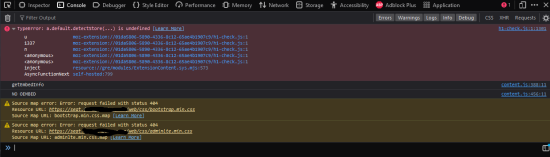
as you can see i dont get any errors..
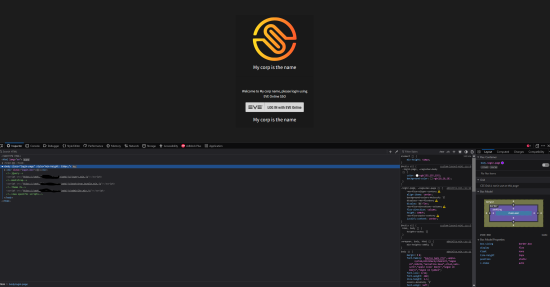
I checked the css code 5 times... and it looks correct
@media all {
    html, body {
        height: auto;
    }

    .login-page, .register.body {
        color: rgb(255,255,255);
    background-color: rgb(28,28,28);
/*
     *  background-image: url(https://web.ccpgamescdn.com/aws/eveonline/sso/background.jpg);
     *  background-position: center center;
     *  background-repeat: no-repeat;
     *  background-size: cover;
     *  background-attachment: fixed;
*/
    }

    .login-box, .register-box {
        width: 360px;
        margin: 0;
        position: absolute;
        top: 50%;
        left: 50%;
        background: rgba(0,0,0,.1);
        transform: translate(-50%, -50%);
/*      border: 5px solid #ecf0f1;
  *     border-radius: 40px;
  *     box-shadow: 0 1px 1px rgba(0,0,0,0.05);
*/
    }

    .login-logo>dev>img, .register-logo {
        font-size: 35px;
        text-align: center;
        margin-bottom: 25px;
        font-weight: 300;
        margin-top: 50px;
    }

    .login-logo>dev>img, .register-logo::before {
        display: block;
        width: 128px;
        height:128px;
        margin: 0 auto;
        content: url("logo.png");
        border-radius: 0%;
        margin-bottom: 0px;
    margin-top: 50px;
    }

    .login-box > div::after {
        content: "My corp is the name";
        display: block;
        text-align: center;
        font-size: 24px;
        margin-top: 0px;
    }

    .login-box-body, .register-box-body {
    text-align: center;
        background: transparent;
        padding: 20px;
        border-top: 0;
        color: inherit;
    }

     .login-box .navbar-brand {
        display: none;
    }

}
Matt Falahe
8 Jun 2024 13:02
@user_255905434970357761 that is weird. Can u show me your docker override file?
Asrik
8 Jun 2024 13:53
version: "3.2"

services:

  front:
    volumes:
     - /opt/seat-docker/custom/custom-layout-mini.css:/var/www/seat/public/custom-layout-mini.css
     - /opt/seat-docker/custom/custom-layout.css:/var/www/seat/public/custom-layout.css
     - /opt/seat-docker/custom/logo.png:/var/www/seat/public/logo.png
Matt Falahe
8 Jun 2024 17:26
Did u bring it down and up again?
Asrik
8 Jun 2024 19:59
of course... over 100 times
Matt Falahe
8 Jun 2024 22:23
That is weird then. Issue must be somewhere else. Check for logs or details. See if there is anything in troubleshooting.
Asrik
9 Jun 2024 19:19
Cant see any errors... I down then up the container to collect the last 10 mins of the log.
Matt Falahe
10 Jun 2024 01:16
Well for some reason your seat is not loading this layout at all.
Asrik
10 Jun 2024 01:17
The part for the Corp name works.. I don't understand why the image won't load.....
Matt Falahe
10 Jun 2024 01:17
I pm'ed u
VeritasLuxMea
10 Jun 2024 15:09
Real quick, is your instance set behind CloudFlare? If so you’ll want to make sure to clear the cache via their site as it can cause issues with styling changes.
Asrik
10 Jun 2024 17:34
Yes i have been doing that a few times.
I just fix the issue. It was permission issue from the OS. I restored a snapshot from a few months ago, and the whole styling changes again. The first time i did get an error of 403 because it couldnt read the file.
Matt Falahe
10 Jun 2024 17:36
he had os permission issue
VeritasLuxMea
10 Jun 2024 17:44
Ah yep that'll do it
recursive_tree
10 Jun 2024 18:47
I haven't read the thread, but wouldn't it be better to improve the official docs instead of writing a guide on discord?
Matt Falahe
10 Jun 2024 21:43
I have no idea who to poke to sort that out.
Crypta Electrica
11 Jun 2024 11:57
me?
Also I know it came up before as to what was wrong with the current guide not working.. But I did not fix it at the time and cant find that message atm. IIRC it was something about a missing div?
Matt Falahe
11 Jun 2024 14:01
Login logo class is not defined and seat logo is forced on top. So if u will use url in the one on the website then after some modifications it will show up but under seat logo.