SeAT - forum: Eve Character Set To Local Admin - Page 1
Kaltekar
6 Nov 2024 22:12
I've setup a new empty Seat instance and logged into the local admin account using the generated link from docker compse. Made sure everything looked good and then in a new tab logged in my main character.
I went back to the Admin tab and and tried giving my main character admin rights but it says that character is the Admin. I can't link other characters to it and it will not list the character name in the sidebar.
I've tried deleting the Character and logging back in and it still says it's the Admin user. I logged in another character, granted it admin rights, then granting my orginal character admin rights and it still shows as the admin user. I've even tried logging in as that character in completely separate browsers (Edge vs Chrome).
Asrik
6 Nov 2024 23:01
On the left side where it says "All Characters" will only show if you have Admin rights. Not sure if you can have permission set just for certain people to see it..
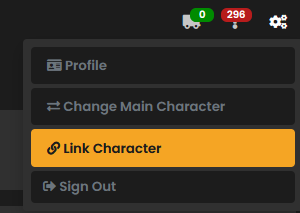
Dont know if you knew or not but on the top right corner if where you add your alts to your main..
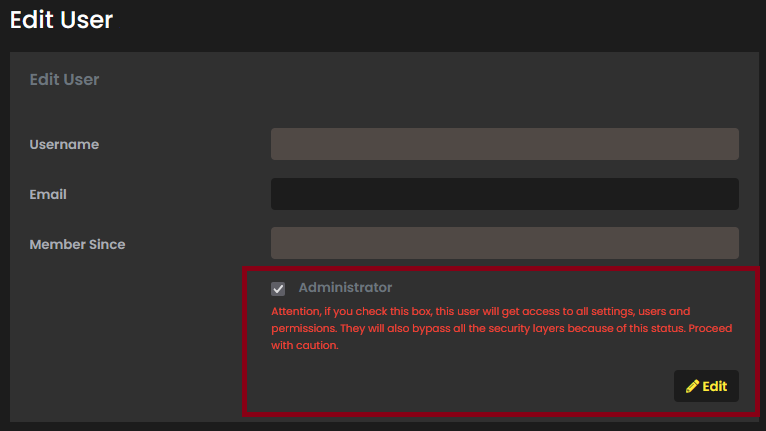
If you want to remove the admin rights, you need to log in as the admin and on the left side, go to settings, users and click on edit. From there is were you can remove the admin.
Kaltekar
6 Nov 2024 23:07
That's sort of what I'm getting at, Only option in the top right is Sign Out. The admin checkbox is greyed out and when i click Edit, it gives me a 403 error saying i need Global.superuser. I can edit other users, just not this one.
The impression i'm getting is that somehow, the local admin has become tied to this particular character.
Asrik
6 Nov 2024 23:38
I believe that is because you are logged in as that character with the admin and not able to remove it. Maybe if you use the admin link (from after the install, for the first time you log in) might a work...
Kaltekar
6 Nov 2024 23:38
Tried that
Is it because this is the character that generated the ESI keys?
Asrik
6 Nov 2024 23:40
Then last advice i can give is start from scratch.
maybe
Kaltekar
6 Nov 2024 23:41
was afraid of that, thanks
Asrik
6 Nov 2024 23:42
sorry, i dont think it generate the esi keys..
Kaltekar
6 Nov 2024 23:43
Is the easiest way to start clean to delete the folder in /opt and rerun the script?
Asrik
6 Nov 2024 23:44
I would say yes. delete the images, volumes, everything and try again..
at least this time you understand how SeAT works.
Kaltekar
6 Nov 2024 23:44
Thank for you help, i appreciate it.
Asrik
6 Nov 2024 23:44
Good luck