SeAT - forum: CSS Not changing - Page 1
VikingValor
13 Apr 2025 17:37
I followed the guide here: https://eveseat.github.io/docs/styling/
I then made this css:
/*
SeAT login page layout with frosted glass effect
/
@media all {
html, body {
height: auto;
}
.login-page, .register.body {
color: rgb(212, 175, 55);
background-image: url(https://ewr1.vultrobjects.com/seatimages/blopsseatbg.png);
background-position: center center;
background-repeat: no-repeat;
background-size: cover;
background-attachment: fixed;
}
.login-box, .register-box {
width: 360px;
margin: 0;
position: absolute;
top: 50%;
left: 50%;
background: rgba(45, 42, 42, 0.5); / More transparent background /
backdrop-filter: blur(8px); / This creates the frosted glass effect /
-webkit-backdrop-filter: blur(8px); / For Safari support /
transform: translate(-50%, -50%);
border: 1px solid rgba(255, 255, 255, 0.18); / Subtle border /
border-radius: 16px; / Reduced border radius for modern look /
box-shadow: 0 8px 32px rgba(0, 0, 0, 0.1); / Enhanced shadow */
}
.login-logo, .register-logo {
font-size: 35px;
text-align: center;
margin-bottom: 25px;
font-weight: 300;
content: url(https://ewr1.vultrobjects.com/seatimages/blopslogo128.png);
margin-top: 50px;
}
.login-logo::before, .register-logo::before {
display: block;
width: 128px;
height:128px;
margin: 0 auto;
border-radius: 50%;
margin-bottom: 50px;
}
.login-box-body, .register-box-body {
background: transparent;
padding: 20px;
border-top: 0;
color: inherit;
}
}
I saved it in /opt/seat-docker/custom/custom-layout-mini.css
This is my override file:
services:
front:
volumes:;)
;)
- /opt/seat-docker/custom/custom-layout-mini.css:/var/www/seat/public/custom-layout-mini.css
- /opt/seat-docker/custom/custom-layout.css:/var/www/seat/public/custom-layout.css
Asrik
13 Apr 2025 18:23
@user_1120726029238026290 https://discord.com/channels/821361165791133716/1247605206372323359/1247605206372323359
VikingValor
13 Apr 2025 18:23
yeah thats not working
Asrik
13 Apr 2025 18:30
did you do this too?
https://discord.com/channels/821361165791133716/1247605206372323359/1247605660485419018
if you did.. then the issue with permissions on the folder or file.
VikingValor
13 Apr 2025 18:33
which folder or file would the perms issue be on?
Asrik
13 Apr 2025 18:34
This is how i did mine..

remember to take a screenshot before you make changes
or at least a snapshot/backup
Matt Falahe
13 Apr 2025 21:11
If you are using my guide but you are using custom url instead of the one from allowed websites you need to do this step https://discord.com/channels/821361165791133716/1247605206372323359/1247605660485419018 and add over there your link in traefik section. In your case https://ewr1.vultrobjects.com. After that follow final step.
VikingValor
13 Apr 2025 21:12
alright I had the whole link thanks
Matt Falahe
13 Apr 2025 21:13
Let me know if that works. I should be at home in few hours so will be able to help more
VikingValor
14 Apr 2025 01:23
so I did that and no change
Asrik
14 Apr 2025 02:00
and the permissions also didnt work?
Matt Falahe
14 Apr 2025 05:26
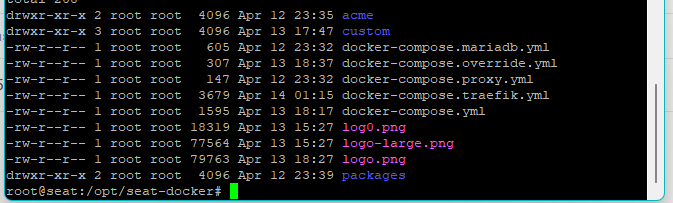
I would have to see errors from your browser console to be sure what is the issue
can you get that?
VikingValor
14 Apr 2025 10:51
yeah
Asrik
14 Apr 2025 18:42
When the issue happened to me.. it was an OS permission issue.. after i rolled back the server about a month or two, it just worked............. every annoying that time...